| PDFsharp & MigraDoc Forum https://forum.pdfsharp.net/ |
|
| Updating from 1.50. to 6.2.3 - problems with FontResolver https://forum.pdfsharp.net/viewtopic.php?f=2&t=4900 |
Page 1 of 1 |
| Author: | OVS [ Tue Nov 25, 2025 12:23 pm ] |
| Post subject: | Updating from 1.50. to 6.2.3 - problems with FontResolver |
Hello, its been a while but I'm glad to see that this project is still running strong! Thank you for your hard work! I'm currently updating depencencies in one of my projects in which the migradoc and pdfsharp libs are used. Currently using version 1.50.4740.0 and updating to 6.2.3.7625 (non GDI and non WPF) The files I used were: MigraDoc.DocumentObjectModel MigraDoc.Rendering PdfSharp.Charting PdfSharp I've already replaced security part: //old //pdfSharpDoc.SecuritySettings.DocumentSecurityLevel = PdfSharp.Pdf.Security.PdfDocumentSecurityLevel.Encrypted128Bit; //new pdfSharpDoc.SecurityHandler.SetEncryptionToV2With128Bits(); and removed //pdfSharpDoc.SecuritySettings.PermitAccessibilityExtractContent = PDFP.PermitAccessibilityExtractContent; Also added the PDFSharpSystem.dll to the project after debugger told me that PdfSharp lib needed it. Hopefully the last step to finish updating the project is the fontresolver. Previously I was defining styles and add them to the document like this: Code: private void DefineStyles(Document Doc) { Style style = Doc.Styles["Normal"]; style.Font.Name = "Arial Unicode MS"; style.Font.Size = 9; //My styles and fonts style = Doc.Styles.AddStyle("Title", "Normal"); style.Font.Name = "Arial Unicode MS"; style.Font.Size = 32; style.Font.Color = Colors.Black; style.ParagraphFormat.PageBreakBefore = false; style.ParagraphFormat.SpaceBefore = 6; style.ParagraphFormat.SpaceAfter = 6; style = Doc.Styles.AddStyle("SummaryTitle", "Normal"); style.Font.Name = "Arial Unicode MS"; style.Font.Size = 26; style.Font.Color = Colors.Black; style.ParagraphFormat.PageBreakBefore = false; style.ParagraphFormat.SpaceBefore = 6; style.ParagraphFormat.SpaceAfter = 6; style = Doc.Styles.AddStyle("SmallBodyFont", "Normal"); style.Font.Name = "Arial Unicode MS"; style.Font.Size = 6; style.Font.Bold = false; style.Font.Color = Colors.Black; style.ParagraphFormat.PageBreakBefore = false; style.ParagraphFormat.SpaceBefore = 6; style.ParagraphFormat.SpaceAfter = 6; style = Doc.Styles.AddStyle("Heading2", "Normal"); style.Font.Name = "Arial Unicode MS"; style.Font.Size = 24; style.Font.Color = Colors.Black; style.ParagraphFormat.PageBreakBefore = false; style.ParagraphFormat.SpaceBefore = 6; style.ParagraphFormat.SpaceAfter = 6; //Bookmark font Workaround for OutlineBookmarks Adobe style = Doc.Styles.AddStyle("Bookmark", "Normal"); style.Font.Name = "Arial Unicode MS"; style.Font.Size = 0.0001; style.Font.Color = Colors.White; style.ParagraphFormat.PageBreakBefore = false; style.ParagraphFormat.SpaceBefore = 6; style.ParagraphFormat.SpaceAfter = 6; //Preset styles and Fonts style = Doc.Styles["Heading1"]; style.Font.Name = "Tahoma"; style.Font.Size = 14; style.Font.Bold = true; style.Font.Color = Colors.DarkBlue; style.ParagraphFormat.PageBreakBefore = true; style.ParagraphFormat.SpaceAfter = 6; style = Doc.Styles["Heading2"]; style.Font.Size = 12; style.Font.Bold = true; style.ParagraphFormat.PageBreakBefore = false; style.ParagraphFormat.SpaceBefore = 6; style.ParagraphFormat.SpaceAfter = 6; style = Doc.Styles["Heading3"]; style.Font.Size = 10; style.Font.Bold = true; style.Font.Italic = true; style.ParagraphFormat.SpaceBefore = 6; style.ParagraphFormat.SpaceAfter = 3; style = Doc.Styles[StyleNames.Header]; style.ParagraphFormat.AddTabStop("16cm", MigraDoc.DocumentObjectModel.TabAlignment.Right); style = Doc.Styles[StyleNames.Footer]; style.ParagraphFormat.AddTabStop("8cm", MigraDoc.DocumentObjectModel.TabAlignment.Center); // Create a new style called TextBox based on style Normal style = Doc.Styles.AddStyle("TextBox", "Normal"); style.ParagraphFormat.Alignment = ParagraphAlignment.Justify; style.ParagraphFormat.Borders.Width = 2.5; style.ParagraphFormat.Borders.Distance = "3pt"; style.ParagraphFormat.Shading.Color = Colors.SkyBlue; // Create a new style called TOC based on style Normal style = Doc.Styles.AddStyle("TOC", "Normal"); style.ParagraphFormat.AddTabStop("16cm", MigraDoc.DocumentObjectModel.TabAlignment.Right, TabLeader.Dots); style.ParagraphFormat.Font.Color = Colors.Blue; } Add this functionality to measure a text to my program (see viewtopic.php?p=9390) Code: public sealed class TextMeasurement { /// <summary> /// Initializes a new instance of the TextMeasurement class with the specified font. /// </summary> public TextMeasurement(Font font) { if (font == null) throw new ArgumentNullException("font"); _font = font; } /// <summary> /// Returns the size of the bounding box of the specified text. /// </summary> public XSize MeasureString(string text, UnitType unitType) { if (text == null) throw new ArgumentNullException("text"); if (!Enum.IsDefined(typeof(UnitType), unitType)) throw new InvalidEnumArgumentException(); XGraphics graphics = Realize(); XSize size = graphics.MeasureString(text, _gdiFont/*, new XPoint(0, 0), StringFormat.GenericTypographic*/); switch (unitType) { case UnitType.Point: break; case UnitType.Centimeter: size.Width = (float)(size.Width * 2.54 / 72); size.Height = (float)(size.Height * 2.54 / 72); break; case UnitType.Inch: size.Width = size.Width / 72; size.Height = size.Height / 72; break; case UnitType.Millimeter: size.Width = (float)(size.Width * 25.4 / 72); size.Height = (float)(size.Height * 25.4 / 72); break; case UnitType.Pica: size.Width = size.Width / 12; size.Height = size.Height / 12; break; default: Debug.Assert(false, "Missing unit type"); break; } return size; } /// <summary> /// Returns the size of the bounding box of the specified text in point. /// </summary> public XSize MeasureString(string text) { return MeasureString(text, UnitType.Point); } /// <summary> /// Gets or sets the font used for measurement. /// </summary> public Font Font { get { return _font; } set { if (value == null) throw new ArgumentNullException("value"); if (_font != value) { _font = value; _gdiFont = null; } } } Font _font; /// <summary> /// Initializes appropriate GDI+ objects. /// </summary> XGraphics Realize() { if (_graphics == null) _graphics = XGraphics.CreateMeasureContext(new XSize(2000, 2000), XGraphicsUnit.Point, XPageDirection.Downwards); //this.graphics.PageUnit = GraphicsUnit.Point; if (_gdiFont == null) { XFontStyleEx style = XFontStyleEx.Regular; if (_font.Bold) style |= XFontStyleEx.Bold; if (_font.Italic) style |= XFontStyleEx.Italic; _gdiFont = new XFont(_font.Name, _font.Size, style/*, System.Drawing.GraphicsUnit.Point*/); } return _graphics; } XFont _gdiFont; XGraphics _graphics; } However with the 6.2.3. version an exception is thrown at this line: _gdiFont = new XFont(_font.Name, _font.Size, style/*, System.Drawing.GraphicsUnit.Point*/); telling me: System.InvalidOperationException: "No appropriate font found for family name 'Arial Unicode MS'. Implement IFontResolver and assign to 'GlobalFontSettings.FontResolver' to use fonts. See https://docs.pdfsharp.net/link/font-resolving.html" I've check the Windows system and was baffled that "Arial Unicode MS" was not installed on the system however worked with 1.50 version. So I checked the PDFs created with 1.50. and saw that "Arial", "Arial Bold" and "Microsoft Sans Serif" was embedded in the document. I already tried this: GlobalFontSettings.UseWindowsFontsUnderWindows = true; but still the same exception is thrown. So my questions are: 1. May I assume that 1.50 encounted the same problem but did a fallback to "Arial" without me noticing it ? 2. How can I resolve this problem in 6.2.3 ? If further information is needed please let me know. Best regards! |
|
| Author: | !!! [ Tue Nov 25, 2025 7:03 pm ] |
| Post subject: | Re: Updating from 1.50. to 6.2.3 - problems with FontResolve |
OVS wrote: Currently using version 1.50.4740.0 and updating to 6.2.3.7625 (non GDI and non WPF) That's the problem: Use the GDI version and font resolving will work like it did with 1.50.
|
|
| Author: | OVS [ Wed Nov 26, 2025 5:29 am ] |
| Post subject: | Re: Updating from 1.50. to 6.2.3 - problems with FontResolve |
Thank you a lot for your answer, I'll test with the GDI version. I guess that version will also have a fallback when 'Arial Unicode MS' is not present on the OS. (see my post point 1.) So does that conclude that there is only a GDI version of 1.50 ? I guess that the changed nomenclature confused me a bit 1.50 does not have a GDI suffix which 6.2.3 now has (e.g. MigraDoc.Rendering vs. MigraDoc.Rendering-gdi) I'll keep this topic updated. BR! |
|
| Author: | Thomas Hoevel [ Thu Nov 27, 2025 12:34 pm ] |
| Post subject: | Re: Updating from 1.50. to 6.2.3 - problems with FontResolve |
OVS wrote: So does that conclude that there is only a GDI version of 1.50? With version 1.50 you have PDFsharp.dll using GDI and PDFsharp-WPF.dll using WPF.With version 6.0, there is PDFsharp.dll not using any Windows functions and thus not loading any fonts automatically, but also supporting Linux, Mac, and other platforms. Plus versions for GDI and WPF only running on Windows. See also: https://docs.pdfsharp.net/General/Overv ... arp-6.html |
|
| Author: | OVS [ Mon Dec 01, 2025 10:15 am ] |
| Post subject: | Re: Updating from 1.50. to 6.2.3 - problems with FontResolve |
Thomas Hoevel wrote: OVS wrote: So does that conclude that there is only a GDI version of 1.50? With version 1.50 you have PDFsharp.dll using GDI and PDFsharp-WPF.dll using WPF.With version 6.0, there is PDFsharp.dll not using any Windows functions and thus not loading any fonts automatically, but also supporting Linux, Mac, and other platforms. Plus versions for GDI and WPF only running on Windows. See also: https://docs.pdfsharp.net/General/Overv ... arp-6.html Thank you very much for that explanation and the link. I just added the new gdi lib files to the project and however (it also needed the 'Microsoft.Extensions.Logging.Abstractions' and 'System.Runtime.CompilerServices.Unsafe' dlls but I still get the error 'System.InvalidOperationException: "No appropriate font found for family name 'Arial'."' in the code from this topic see viewtopic.php?p=9390. To be precise in this line: Code: _gdiFont = new XFont(_font.Name, _font.Size, style/*, System.Drawing.GraphicsUnit.Point*/); Arial is installed on the System and defined in my code (see private void DefineStyles(Document Doc){...} see entry post) I've tired the FontResolver (https://docs.pdfsharp.net/PDFsharp/Topi ... t-resolver) and the option GlobalFontSettings.UseWindowsFontsUnderWindows = true; Still the same exception is thrown. Any advice? Edit: .NET Framework 4.8 x64 is used. BR OVS |
|
| Author: | !!! [ Mon Dec 01, 2025 5:02 pm ] |
| Post subject: | Re: Updating from 1.50. to 6.2.3 - problems with FontResolve |
OVS wrote: Any advice? Difficult to identify a problem when seeing just code snippets.You don't have to set a font resolver when using the GDI build. You can download the PDFsharp samples from GitHub or get the Issue Submission Template to start simple and then add some test code. |
|
| Author: | OVS [ Mon Jan 05, 2026 7:37 am ] | |||
| Post subject: | Re: Updating from 1.50. to 6.2.3 - problems with FontResolve | |||
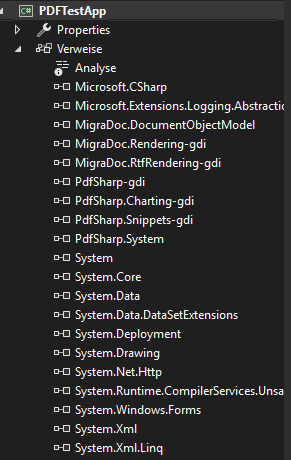
Hello, there and happy new year. Sorry for the late response due to holiday season. I've used the Issue Submission Template (IST) and integrated the sealed class 'TextMeasurement' which trows the described exception in the XGrapics Realize(){...} method in my project. The IST however runs without error when using 'Arial' as font (it creates a blank white page). When using 'Arial Unicode MS' it fails like in my project (same exption msg). What makes me wonder is that when I change the font 'Arial Unicode MS' to 'Arial' in my project it still fails, telling me "No appropriate font found for family name 'Arial'". Hard to put a finger on the cause and spot the difference in the IST project and mine. The references of my project are shown in the image attached. Thank you! Edit: Tried to set a XFont like this in the DefineStyles(...) method in my project. : Code: var myFont = new XFont("Arial", 10, XFontStyleEx.Regular); and getting the same exception back : System.InvalidOperationException: "No appropriate font found for family name 'Arial'".
|
||||
| Author: | OVS [ Tue Jan 06, 2026 7:33 am ] | ||
| Post subject: | Re: Updating from 1.50. to 6.2.3 - problems with FontResolve | ||
So, I could replicate the problem with a new Windows Forms-App (.NET Framework) smaller project. VS 2022 Targetframework .NET Framework 4.8 In its core it is the Issue Submission Template but not a console application but a Windows Forms application. I omitted the save and show PDF file part. When defining a XFont it will throw an exeption like in my project. Refered libs see attachment. All V 6.3.2 If any additional info is needed please let me know. Full code of Form1 Code: using System; using System.Collections.Generic; using System.ComponentModel; using System.Windows.Forms; using System.Diagnostics; using MigraDoc.DocumentObjectModel; using MigraDoc.DocumentObjectModel.Fields; using MigraDoc.DocumentObjectModel.Visitors; using MigraDoc.Rendering; using PdfSharp.Drawing; using PdfSharp.Fonts; using PdfSharp.Pdf; using PdfSharp.Pdf.IO; using PdfSharp.Snippets.Font; namespace PDFTestApp { public partial class Form1 : Form { public Form1() { InitializeComponent(); } private void button1_Click(object sender, EventArgs e) { var document = CreateDocument(); // Associate the MigraDoc document with a renderer. var pdfRenderer = new PdfDocumentRenderer { Document = document, PdfDocument = new PdfDocument { PageLayout = PdfPageLayout.SinglePage } }; // Layout and render document to PDF. pdfRenderer.RenderDocument(); #if DEBUG // Create PDF files that are somewhat human-readable. pdfRenderer.PdfDocument.Options.Layout = PdfWriterLayout.Verbose; #endif } static Document CreateDocument() { // Create a new MigraDoc document. var document = new Document { Info = { Title = "MigraDoc Issue Template", Author = "Your Name", Subject = "Demonstrate an issue of MigraDoc" } }; //Defining style DefineStyles(document); // Add a section to the document. var section = document.AddSection(); // Add a paragraph to the section. var paragraph = section.AddParagraph(); // Set font color. paragraph.Format.Font.Color = Colors.DarkBlue; // Add some text to the paragraph. Font ParaFont = document.Styles["SummaryTitle"].Font.Clone(); paragraph.AddFormattedText("Minimal, reproducible example", ParaFont); var myFont = new XFont("Arial", 10, XFontStyleEx.Regular); //My Code measure string calling CalculateStringSize(ParaFont, "Foo", UnitType.Point); double FSize = document.Styles["SummaryTitle"].Font.Size; CalculateStringSize1(document, ParaFont, FSize, "Foo"); // Create the primary footer. var footer = section.Footers.Primary; // Add content to footer. paragraph = footer.AddParagraph(); paragraph.Add(new DateField { Format = "yyyy/MM/dd HH:mm:ss" }); paragraph.Format.Alignment = ParagraphAlignment.Center; return document; } public static XSize CalculateStringSize(Font Font, string InputStr, UnitType Unit) { XSize Size; List<XSize> Sizes = new List<XSize>(); MigraDoc.DocumentObjectModel.TextMeasurement t = new MigraDoc.DocumentObjectModel.TextMeasurement(Font); Size = t.MeasureString(InputStr, Unit); return Size; //= Sizes.Max(o => o.Width); } public static double CalculateStringSize1(Document Doc, Font Font, double FontSize, string InputStr) { double ColSize; List<XSize> Sizes = new List<XSize>(); Font.Size = FontSize; MigraDoc.DocumentObjectModel.TextMeasurement tm = new MigraDoc.DocumentObjectModel.TextMeasurement(Font); ColSize = tm.MeasureString(InputStr, UnitType.Point).Width; return ColSize; //= Sizes.Max(o => o.Width); } private static void DefineStyles(Document Doc) { // Get the predefined style Normal. Style style = Doc.Styles["Normal"]; // Because all styles are derived from Normal, the next line changes the // font of the whole document. Or, more exactly, it changes the font of // all styles and paragraphs that do not redefine the font. //style.Font.Name = "Times New Roman"; style.Font.Name = "Arial"; style.Font.Size = 9; // Heading1 to Heading9 are predefined styles with an outline level. An outline level // other than OutlineLevel.BodyText automatically creates the outline (or bookmarks) // in PDF. //My styles and fonts style = Doc.Styles.AddStyle("Title", "Normal"); style.Font.Name = "Arial"; style.Font.Size = 32; style.Font.Color = Colors.Black; style.ParagraphFormat.PageBreakBefore = false; style.ParagraphFormat.SpaceBefore = 6; style.ParagraphFormat.SpaceAfter = 6; style = Doc.Styles.AddStyle("SummaryTitle", "Normal"); style.Font.Name = "Arial"; style.Font.Size = 26; style.Font.Color = Colors.Black; style.ParagraphFormat.PageBreakBefore = false; style.ParagraphFormat.SpaceBefore = 6; style.ParagraphFormat.SpaceAfter = 6; style = Doc.Styles.AddStyle("SmallBodyFont", "Normal"); style.Font.Name = "Arial"; style.Font.Size = 6; style.Font.Bold = false; style.Font.Color = Colors.Black; style.ParagraphFormat.PageBreakBefore = false; style.ParagraphFormat.SpaceBefore = 6; style.ParagraphFormat.SpaceAfter = 6; style = Doc.Styles.AddStyle("Heading2", "Normal"); style.Font.Name = "Arial"; style.Font.Size = 24; style.Font.Color = Colors.Black; style.ParagraphFormat.PageBreakBefore = false; style.ParagraphFormat.SpaceBefore = 6; style.ParagraphFormat.SpaceAfter = 6; //Bookmark font Workaround for OutlineBookmarks Adobe style = Doc.Styles.AddStyle("Bookmark", "Normal"); style.Font.Name = "Arial Unicode MS"; style.Font.Size = 0.0001; style.Font.Color = Colors.White; style.ParagraphFormat.PageBreakBefore = false; style.ParagraphFormat.SpaceBefore = 6; style.ParagraphFormat.SpaceAfter = 6; //Preset styles and Fonts style = Doc.Styles["Heading1"]; style.Font.Name = "Tahoma"; style.Font.Size = 14; style.Font.Bold = true; style.Font.Color = Colors.DarkBlue; style.ParagraphFormat.PageBreakBefore = true; style.ParagraphFormat.SpaceAfter = 6; style = Doc.Styles["Heading2"]; style.Font.Size = 12; style.Font.Bold = true; style.ParagraphFormat.PageBreakBefore = false; style.ParagraphFormat.SpaceBefore = 6; style.ParagraphFormat.SpaceAfter = 6; style = Doc.Styles["Heading3"]; style.Font.Size = 10; style.Font.Bold = true; style.Font.Italic = true; style.ParagraphFormat.SpaceBefore = 6; style.ParagraphFormat.SpaceAfter = 3; style = Doc.Styles[StyleNames.Header]; style.ParagraphFormat.AddTabStop("16cm", MigraDoc.DocumentObjectModel.TabAlignment.Right); style = Doc.Styles[StyleNames.Footer]; style.ParagraphFormat.AddTabStop("8cm", MigraDoc.DocumentObjectModel.TabAlignment.Center); // Create a new style called TextBox based on style Normal style = Doc.Styles.AddStyle("TextBox", "Normal"); style.ParagraphFormat.Alignment = ParagraphAlignment.Justify; style.ParagraphFormat.Borders.Width = 2.5; style.ParagraphFormat.Borders.Distance = "3pt"; style.ParagraphFormat.Shading.Color = Colors.SkyBlue; // Create a new style called TOC based on style Normal style = Doc.Styles.AddStyle("TOC", "Normal"); style.ParagraphFormat.AddTabStop("16cm", MigraDoc.DocumentObjectModel.TabAlignment.Right, TabLeader.Dots); style.ParagraphFormat.Font.Color = Colors.Blue; } } } namespace MigraDoc.DocumentObjectModel { /// <summary> /// Provides functionality to measure the width of text during document design time. /// </summary> public sealed class TextMeasurement { /// <summary> /// Initializes a new instance of the TextMeasurement class with the specified font. /// </summary> public TextMeasurement(Font font) { if (font == null) throw new ArgumentNullException("font"); _font = font; } /// <summary> /// Returns the size of the bounding box of the specified text. /// </summary> public XSize MeasureString(string text, UnitType unitType) { if (text == null) throw new ArgumentNullException("text"); if (!Enum.IsDefined(typeof(UnitType), unitType)) throw new InvalidEnumArgumentException(); XGraphics graphics = Realize(); XSize size = graphics.MeasureString(text, _gdiFont/*, new XPoint(0, 0), StringFormat.GenericTypographic*/); switch (unitType) { case UnitType.Point: break; case UnitType.Centimeter: size.Width = (float)(size.Width * 2.54 / 72); size.Height = (float)(size.Height * 2.54 / 72); break; case UnitType.Inch: size.Width = size.Width / 72; size.Height = size.Height / 72; break; case UnitType.Millimeter: size.Width = (float)(size.Width * 25.4 / 72); size.Height = (float)(size.Height * 25.4 / 72); break; case UnitType.Pica: size.Width = size.Width / 12; size.Height = size.Height / 12; break; default: Debug.Assert(false, "Missing unit type"); break; } return size; } /// <summary> /// Returns the size of the bounding box of the specified text in point. /// </summary> public XSize MeasureString(string text) { return MeasureString(text, UnitType.Point); } /// <summary> /// Gets or sets the font used for measurement. /// </summary> public Font Font { get { return _font; } set { if (value == null) throw new ArgumentNullException("value"); if (_font != value) { _font = value; _gdiFont = null; } } } Font _font; /// <summary> /// Initializes appropriate GDI+ objects. /// </summary> XGraphics Realize() { if (_graphics == null) _graphics = XGraphics.CreateMeasureContext(new XSize(2000, 2000), XGraphicsUnit.Point, XPageDirection.Downwards); //this.graphics.PageUnit = GraphicsUnit.Point; if (_gdiFont == null) { XFontStyleEx style = XFontStyleEx.Regular; if (_font.Bold) style |= XFontStyleEx.Bold; if (_font.Italic) style |= XFontStyleEx.Italic; _gdiFont = new XFont(_font.Name, _font.Size, style/*, System.Drawing.GraphicsUnit.Point*/); } return _graphics; } XFont _gdiFont; XGraphics _graphics; } } EDIT: I changed the TestApp to use the WPF version and added the PresentationCore reference. Program is running fine. So something seems off with the gdi version.
|
|||
| Author: | Thomas Hoevel [ Thu Jan 08, 2026 6:48 am ] |
| Post subject: | Re: Updating from 1.50. to 6.2.3 - problems with FontResolve |
OVS wrote: Full code of Form1 The point of the IST: We receive a ZIP with a complete solution to look at to avoid wasting time with inspections of partial code that requires a lot of time to make things compile.
|
|
| Author: | OVS [ Thu Jan 08, 2026 7:19 am ] |
| Post subject: | Re: Updating from 1.50. to 6.2.3 - problems with FontResolve |
Thomas Hoevel wrote: OVS wrote: Full code of Form1 The point of the IST: We receive a ZIP with a complete solution to look at to avoid wasting time with inspections of partial code that requires a lot of time to make things compile.Thank you for your reply. I do understand this. I thought I would be not be a big thing creating a new empty WinForms Project adding a button an copy + past the given code. But I was wrong. Sorry about that. I keep that in mind in the future. However the good news is I got my bigger project running. What I did: 1) Removing all references to libs that come with the GDI version 2) Adding references to libs of the WPF version 3) Compiling -> Err reference PresentationCore needed 4) Adding PresentationCore reference 5) Compile and run 6) Removing WPF lib and PresentationCore references 7) Adding references to libs of the GDI version 8 ) Compile and run. I do not know why it is working now. I have removed, added libs and re-build the project several times. At first glance it is running as it should but I'm still investigating. |
|
| Page 1 of 1 | All times are UTC |
| Powered by phpBB® Forum Software © phpBB Group https://www.phpbb.com/ |
|